

Our own · InklingRunning (our own)inkling.octyn.co ↗
Inkling.
A markdown workspace that keeps every note as a plain file on your own disk, lets a crew edit one document live, and refuses to touch git unless a person presses push.
For your content teamInside: plain files on your disk · live co-editing · push only by a person
Inkling, to look at.
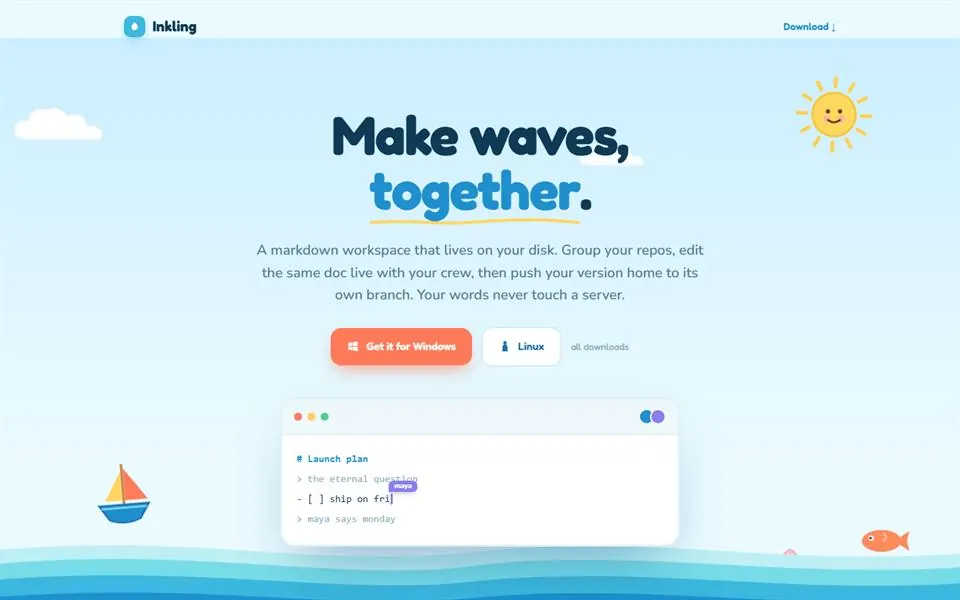
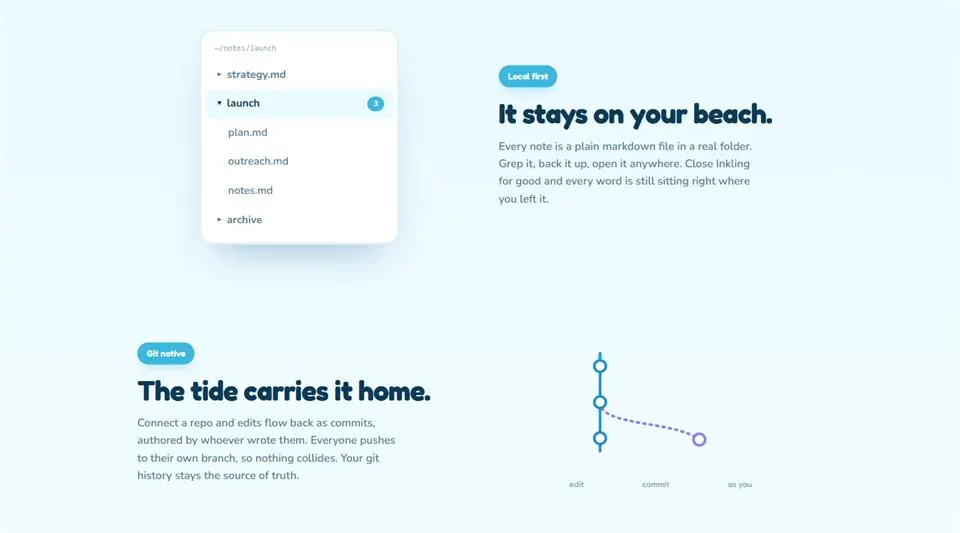
Running, and ours. These are Inkling's own screens in its own colours: its site, and the two panels it shows for the folder and for git. They are screenshots, not a recording of a session.
In shortA markdown workspace that keeps every note as a plain file on your own disk, lets a crew edit one document live, and touches git only when a person presses push.
- Every note is a plain file in a real folder.Search it the ordinary way. Back it up the way you back up the folder.Read how
- A crew can sit in one document together.The live session belongs to the document, not to a branch.Read how
- Each branch gets a folder of its own.Switching branch means switching directory.Read how
- Nothing reaches git until a person presses push.Push commits to the branch that person chose.Read how
- Anyone can download it.Windows and Linux builds. Nobody has counted the downloads.Read how
The deep dive.
The same product, taken apart: what each part of its screens holds, the four rules it runs on, one line followed from keystroke to commit, and where it does not go straight through.
Owning your notes and sharing them pulled apart.
A notes app that owns the notes is the trap. The file sits inside a database that cannot be opened directly, the sync is a subscription, and the day the subscription stops, the writing is hostage. The other half of the trap is the opposite one: keep everything as plain files in a git repo and ownership comes with no live collaboration at all, because a shared file and a real-time session are not the same problem and git answers only one of them.
Inkling was started on 2026-07-11 to take both halves. Every note is a plain markdown file in a real folder on the writer's own disk, searchable the ordinary way and backed up by whatever already backs up that folder, and a crew can still sit in one document together.
The screens, taken apart.
Two screens, six parts.
The site on the left says what Inkling is and where to get it. The panels beside it show the two ideas under it: notes as files, and git on your say. The steps below take the parts one at a time.
- The whole surface
Two screens, six parts.
The site on the left says what Inkling is and where to get it. The panels beside it show the two ideas under it: notes as files, and git on your say. The steps below take the parts one at a time.
- Top · The pitch
The product in one line.
A markdown workspace that lives on your disk. Group your repos, edit the same doc live with your crew, then push your version home to its own branch. The site says so before it asks for anything.
- Middle · The download
A stranger can download it.
There are Windows and Linux builds, and an update feed served from OCTYN's own server. That is why Inkling leads the case studies: it can be tried without asking anyone. The desktop build carries no code signature yet, so Windows warns on first run.
- Bottom · The editor
One document, edited live.
The surface is plain, with a live preview written for it. The session is keyed to the document, so a late joiner gets the current state on arrival. Every keystroke is also written to that person's own disk, so the server is a relay and never the only copy.
- Left · The folder
A real folder on a real disk.
Each note is a markdown file. A multi-root explorer lists the folders. When something outside the app changes a file, such as a terminal or an assistant, a watcher refreshes the tree and reloads the notes that are open and clean.
- Bottom · The branches
Edits flow home as commits, when you say.
Each repository and branch pair gets its own checkout, so switching branch means switching directory. Push is a confirmed act. It takes the session's current text and commits it to the branch that person chose.
Four rules Inkling runs on.
Inkling is our own product, in use every day. These drawings are made from the write-up, on sample text. They are not recordings of the app.
How a note stays a file.
live session connected
How a crew shares one document.
How a branch becomes a folder.
~/inkling/notes
main/plan.md
redesign/plan.mdunsaved edits
How a commit happens.
main
redesign
One line, from keystroke to commit.
A line is written, and it is already a file.
The line goes into plan.md in a folder on the writer's own disk. Autosave writes to that file.
# Launch plan
- [ ] ship on fri
> maya says mondaymaya
Saved to the file on disk.
main
redesign
Where it does not go straight through.
- plan.md · on disk
# Launch plan
- [ ] ship on fri
live session stopped
The network or the server goes.
The editor keeps working, because the file is already on disk. What stops is the live session. Push still works, because push goes straight to the code host.
~/notes/launch
plan.mdchanged outside, reloaded
outreach.mdwritten by the app, ignored
A file changes from outside.
An assistant, a terminal or a pull edits a file. The watcher refreshes the tree and reloads the notes that are open and clean. It ignores writes the app made itself, so the app does not chase its own tail.
- safe checkout
- clone guarding
- checkout paths
- no-op pushes
- root de-duplication
- workspace state
- shared spaces
- shared spaces
The tests are about git, not editing.
All eight test files in the repo on 14 July 2026 are about git or workspace safety. An editor bug loses a keystroke. A git bug loses a document. A push that would change nothing is one of the cases with a test.
- Press pushthe writerNothing commits or pushes on its own anywhere in the design.
- Choose the branchthe writerPush commits the session's current text to the branch that person chose.
- Switch the assistant on or offOCTYN, on the serverWhich model it uses, whether it runs at all, and the update feed are settings, so none needs a release.
What Inkling does, with its dates.
- 14 July 2026
- Version 0.2.3, Windows and Linux builds. Source: package.json, octynhq/inkling.
- 2026-07-11 to 2026-07-14
- 144 commits across 86 tracked files. Source: git log and git ls-files, octynhq/inkling.
- 14 July 2026
- 8 test files, all of them about git or workspace safety. Source: test/, octynhq/inkling.
- 14 September 2026
- No download count recorded. Source: no download telemetry in the repo.
- Under load
- Not measured. There is no download telemetry in the repo and no usage instrumentation, so there is no download count and no concurrent-session figure. The figure that matters later is participants per document.
- The line it holds
- Nothing commits or pushes on its own anywhere in the design.
- Unresolved
- The desktop build carries no code signature yet, so Windows warns on first run.
- Who runs it
- Inkling is OCTYN's own product, written in every day, with its server deployed and run by OCTYN.
Something like this, for your company?
The first conversation is with the people who would build it. If there is a fit, the Consult comes next.